
FROM RESEARCH QUESTION TO EVIDENCE SYNTHESIS
AI-assisted systematic review software.
Your whole workflow, connected.
MetaSyntra brings literature search, citation deduplication, study screening, data extraction, risk-of-bias assessment and R-powered meta-analysis into one browser-based research workspace.
Work independently with your team, use optional AI assistance where it helps, and keep researchers responsible for the evidence and final decisions.
Free workspace available. AI usage, analysis allowances and paid features depend on your plan. See current plans and allowances.
ONE CONNECTED PIPELINE
Move from a question to a review you can inspect.
Start with an idea or bring an existing review. Each stage supports a different research decision; moving faster does not remove the need for appropriate methods or human verification.
- 01
Explore the research question
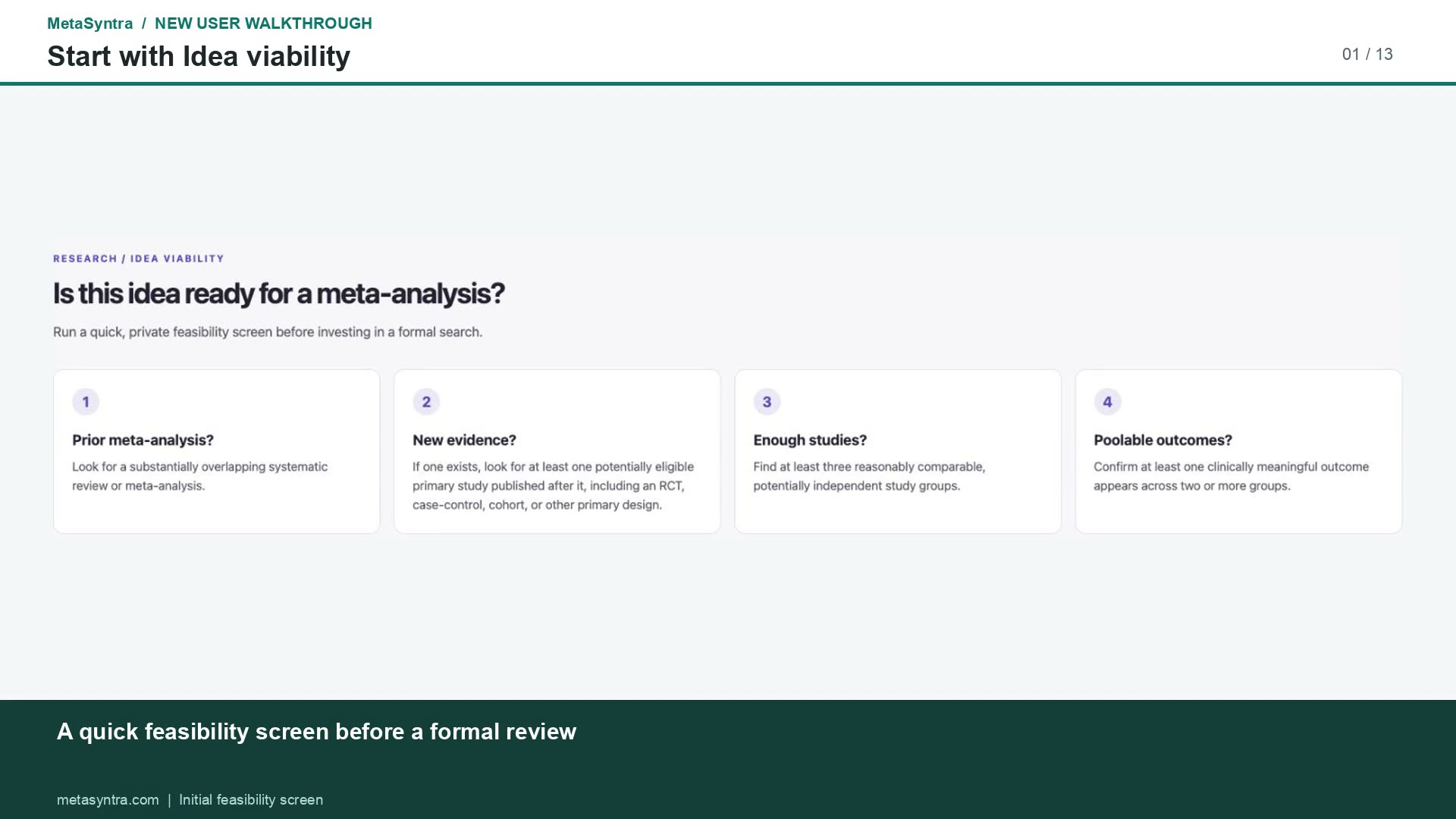
Use research discovery and Idea Viability to explore recent evidence, existing reviews and potential study overlap. Treat feasibility findings as a starting point for investigation, not a substitute for a formal literature search.
- 02
Define the protocol and eligibility criteria
Specify your population, intervention or exposure, comparator, outcomes, timing and eligible designs. Agree on inclusion and exclusion rules before screening and keep the team working from the approved criteria.
- 03
Prepare searches and import citations
Develop database search strategies and bring reference exports into the project. Supported import formats include PubMed NBIB, MEDLINE text or XML, RIS and reference CSV. Review search coverage with your team or information specialist.
- 04
Review possible duplicates
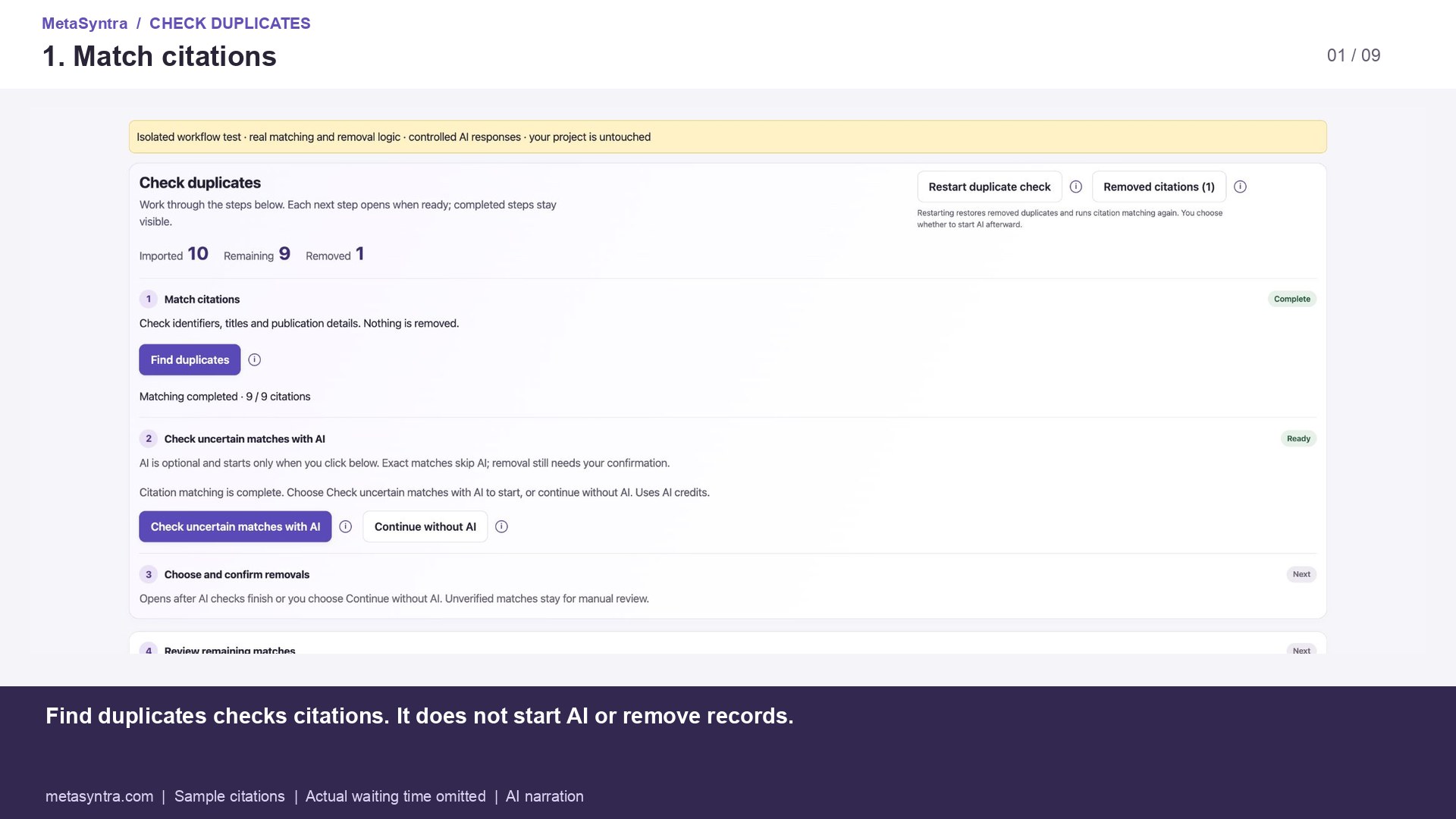
Compare identifiers, titles and publication details. Review matching suggestions and confirm removals yourself. Keep different reports of the same study when they contribute useful information. Removal history and Undo support correction.
- 05
Screen titles, abstracts and full texts
Allocate studies to independent human reviewers. Open assigned work, read the source, choose Include, Exclude or Unclear, and save and continue. Title and abstract exclusion reasons are optional; full-text exclusions require a primary exclusion reason or supporting comment. Retrieve the full report before final full-text decisions.
- 06
Extract and verify study data
Record outcomes, comparisons, time points and source evidence. Review optional AI drafts against the paper, retain useful notes, compare submitted reviewer forms and reconcile differences before approving data for analysis.
- 07
Assess risk of bias
Select an appropriate assessment tool for the study design and review question. Record judgments with their supporting evidence, compare reviewer assessments and approve the reconciled assessment. AI assistance does not replace the tool’s methodological guidance.
- 08
Run meta-analysis and prepare reports
Inspect the approved dataset and analysis plan, then run R-powered analyses. MetaSyntra supports pairwise, single-arm, diagnostic and network meta-analysis workflows. Review model choices, heterogeneity, plots and outputs before downloading results for your research report.
SEE THE SOFTWARE
Real screens from the MetaSyntra walkthroughs.
These are actual interface captures from our public tutorials. The duplicate-review example uses sample citations and controlled AI responses in an isolated demonstration; it is not a benchmark or a completed research review.
REVIEW TOGETHER
Independent decisions. A shared review process.
Assign work to reviewers and monitor team progress. Reviewers make their own screening decisions; questions and disagreements can be referred to the team leader. Saved work remains available while the team reconciles decisions and prepares approved data.
Two human reviews per reference are used in the team screening workflow. AI suggestions remain separate from human decisions. Reviewers can return to saved studies, and leaders control AI prediction visibility for their team.
AI ASSISTANCE, WITH HUMAN OVERSIGHT
Get help with the work. Keep control of the decisions.
Optional AI assistance can support idea development, search preparation, duplicate checks, screening, extraction and analysis preparation. Check each suggestion against the source and your protocol. Model outputs can be incomplete or incorrect.
AI is advisory. It does not count as an independent human reviewer, establish methodological validity or guarantee publication-ready results. Use the review guide and the relevant methodological standards alongside the software.
Projects can use supported local model connections or available hosted assistance according to project settings. Availability and usage allowances depend on configuration and plan. See how to use AI assistance and read the research disclaimer.
BEFORE YOU START
Questions about systematic review software.
Can I use MetaSyntra without AI?
Yes. You can conduct manual screening and enter and review study data yourself. Optional AI suggestions support the workflow; researchers verify the evidence and submit their own decisions.
Does MetaSyntra replace a systematic review protocol or an information specialist?
No. Your team still defines the research question, methods, search strategy and eligibility criteria. The software helps organize and perform that work; it does not replace methodological expertise or a comprehensive search.
Can my team screen the same studies independently?
Yes. Team screening assigns references for two independent human reviews, tracks progress and provides a process for referring questions and disagreements to the leader.
Can I start with data I already extracted?
Yes. The analysis workspace accepts CSV or Excel study data. Review the imported columns and analysis settings before running the appropriate R-powered analysis.
Are my project records public?
Research workspaces require sign-in and use account and project permissions. This public page displays only screenshots already available in MetaSyntra’s public tutorials. Read the privacy notice for data handling and service-administration details.
Is MetaSyntra free?
A free workspace is available. Paid plans and usage allowances apply to some AI and analysis features. Check current pricing and allowances before starting resource-intensive work.
Bring your next review into one workspace.
Start with a research question or an existing dataset, and work through the evidence with your team.